



You know that sinking feeling when your booking system shows 42 students registered for tomorrow's vinyasa class, but your payment processor only recorded 38 transactions? Meanwhile, your CRM thinks 45 people are coming because three cancellations never synced back.
The sync failures quietly draining your Monday mornings
This isn't just annoying — it's operationally destructive. Most yoga studios run between 3-7 different software platforms, and when they don't communicate properly, you're basically running blind. These sync failures compound over time too. What starts as a minor discrepancy in week one becomes a complete data mess by month three.
The pattern plays out the same way: studios start manually reconciling differences, then move to spreadsheet tracking, and eventually either give up or build elaborate workarounds that eat hours of admin time every week. The integration problems don't go away. They just get buried under more process.
Why integration breaks down differently at different scales
When you're running 15 classes weekly from one location, integration problems are annoying but manageable. You notice when Sarah's membership payment fails but she still shows up to class. You catch it, fix it, move on.
Eliminate class scheduling chaos.
Yoglyly helps you book, confirm & manage every class seamlessly.
- Centralized class scheduling
- Member notifications
- Instructor and resource management
No credit card required
Something shifts around 25-30 weekly classes. The manual oversight that worked before starts breaking down. You can't personally track every student's payment status. Your front desk staff doesn't know everyone by name. Suddenly those small sync gaps become real operational sinkholes.
The breaking points typically happen in three waves:
First wave (10-20 classes/week): Payment failures don't update booking status. Students show up thinking they're registered, awkward conversations follow.
Second wave (20-35 classes/week): Membership changes don't propagate correctly. Someone upgrades from 4-class to unlimited, but the booking system still caps them. Or they downgrade but keep booking unlimited classes because the systems aren't talking.
Third wave (35+ classes/week): The data becomes so inconsistent that you can't trust any single system. Revenue reporting shows different numbers everywhere. Customer service becomes a detective mission every time someone has a question about their account.
Most studio owners don't realize they're heading toward these cliffs until they've already fallen off them.
Data mapping: the unsexy foundation everyone skips
Nobody tells you this about integrations: the fancy API connections are actually the easy part. The hard part is deciding what should happen when systems disagree.
Take a basic scenario. A student books a class at 11:47 PM for tomorrow's 6 AM session. Your booking system processes it immediately. Your payment system tries to charge their card but gets a decline. The CRM logs the booking attempt but doesn't know about the payment failure yet. Which system wins? Does the booking get cancelled? Does the student get notified? What if they're on an unlimited membership that should have renewed yesterday but the payment is still processing?
Most studios never map out these decisions, which is exactly why their integrations feel held together with duct tape. A proper data mapping template needs to cover:
Primary source of truth definitions: For each data type — customer info, payment status, booking status, membership level — you need ONE system that's the ultimate authority. Everything else syncs from there.
Field-level mapping: Your booking system calls it "memberstatus" but your CRM calls it "subscriptiontype" and your payment processor calls it "plan_id". Without explicit mapping, these never sync properly.
Conflict resolution rules: When two systems show different values for the same field, which one wins? Always the most recent? Always the payment system? The answer changes depending on the field and the situation.
One studio with around 1,400 active members across three locations had let their booking system and CRM slowly drift apart for two years. During the initial audit, we found roughly 340 members with different membership statuses across systems. Some people were getting unlimited access on expired memberships. Others were being blocked from booking despite active payments. The cleanup took three weeks, but the mapping document we built prevents it from happening again.
Here's roughly how that field mapping looks in practice:
| Data Type | Source of Truth | Syncs To | Conflict Rule |
|---|---|---|---|
| Payment status | Payment processor | Booking system, CRM | Payment processor always wins |
| Booking status | Booking system | CRM | Most recent timestamp wins |
| Membership level | CRM | Booking system | CRM wins, payment processor validates |
| Customer profile | CRM | Booking system, payment processor | CRM wins except email (most recent) |
| Class attendance | Booking system | CRM | Booking system always wins |
Keep the mapping document in a shared, version-controlled place so every change is tracked and reversible.
Getting this table filled out for your own systems — before something breaks — is probably the highest-leverage thing you can do this week.
Sync cadence: real-time isn't always better
Everyone wants real-time syncing until they see what it actually means operationally.
Picture this: a student books a class, triggers a sync. Changes their mind 3 minutes later and switches to a different time, triggers another sync. Payment method fails so the booking gets cancelled, another sync. Student updates payment and re-books, another sync. All within 15 minutes. That's four sync operations for what should be one simple booking. Multiply that by 50-100 bookings per day and your systems are constantly churning through updates, many of which are just noise.
The smarter approach uses tiered sync schedules:
Critical operations (real-time):
-
Payment captures
-
Class cancellations less than 2 hours before start
-
Membership downgrades
-
Account suspensions
Standard operations (every 15-30 minutes):
-
New bookings
-
Profile updates
-
Regular class cancellations
-
Instructor schedule changes
Batch operations (daily):
-
Historical data cleanup
-
Report generation
-
Archived record updates
-
Email preference changes
A studio running 45 classes weekly across two locations cut their sync-related errors by around 70% just by moving from real-time to intelligent batch syncing. The real-time syncs were actually causing race conditions where systems would overwrite each other's updates.
The tiered approach sounds counterintuitive. But the goal isn't speed — it's reliability. A sync that completes correctly on a 20-minute delay is worth more than one that fires instantly and corrupts data half the time.
Failure handling: what happens when sync dies at 5 AM
Your Saturday morning 8 AM power flow fills to capacity — 35 spots. It's 5:23 AM and your payment processor goes down. The integration fails. New bookings can't process payments. But your booking system doesn't know this and keeps accepting registrations.
By 7:45 AM, you have 41 people registered for 35 spots, and no idea who actually paid.
This scenario plays out every few months at studios without proper failure handling. The solutions aren't complex, but they need to be decided before the failure happens:
Circuit breaker patterns: After 3 failed sync attempts in a short window, the system stops trying and alerts someone. This prevents cascading failures where one broken integration takes down everything else.
Fallback protocols: When payment verification fails, what's the default? Accept the booking and reconcile later? Block the booking until payment clears? The answer depends on your business model and risk tolerance.
Recovery queues: Failed syncs go into a queue for retry. But not all failures are equal. A failed membership renewal needs immediate retry. A failed email preference update can wait 24 hours.
Write these rules when everything is working fine, not during a Saturday morning crisis.
Reconciliation checks that actually catch problems
Most studios run reconciliation once something is obviously broken. By then you're doing forensic accounting instead of preventive maintenance.
Effective reconciliation happens on a schedule, not on suspicion. Here's a check framework that works:
Daily checks (automated alerts):
-
Booking count vs payment count for next day's classes
-
New memberships in CRM vs payment processor
-
Cancellations processed across all systems
-
Failed payment retry queue status
Weekly checks (manual review):
-
Revenue totals across all three systems
-
Membership status discrepancies
-
Class attendance vs bookings
-
Instructor payout calculations vs actual classes taught
Monthly deep-dive:
-
Complete member roster comparison
-
Historical booking accuracy
-
Payment reconciliation including refunds and chargebacks
-
Data quality scoring
A studio with around 850 active members runs this exact framework. They catch the vast majority of sync issues within 24 hours instead of discovering them weeks later during month-end closing. Admin time dropped from roughly 12 hours weekly to about 3 — mostly because they're preventing problems instead of investigating mysteries.
The audit workflow that prevents meltdowns
The same studio that had 340 members showing different statuses now runs quarterly audits that take about 2 hours and prevent those massive divergences from building up again.
The audit workflow isn't just checking numbers — it's testing the entire integration chain. Below is the four-step process in order:
-
Sample testing — Pick 10 random members. Trace their complete journey through all systems for the past month. Every booking, payment, cancellation, and change should match exactly across platforms.
-
Edge case validation — Test the weird scenarios
what happens when someone books during a payment failure? When they upgrade membership mid-month? When they dispute a charge? These edge cases are where integrations usually break.
-
Sync pathway verification — Create a test booking and watch it flow through all systems. Change it. Cancel it. Reinstate it. Every step should propagate correctly within your defined sync windows.
-
Historical drift analysis — Compare key metrics from 30, 60, and 90 days ago. Are the numbers still matching? Historical data tends to drift when sync failures get "fixed" in one system but not back-propagated to others.
Running these four steps in order matters. Confirm the basics work before stress-testing edge cases, and stress-test edge cases before you trust your historical data comparisons.
How integration governance flows across your studio
A useful way to visualize this is as a continuous loop rather than a one-time setup. Data enters through bookings or payments, flows to the CRM as the central record, syncs out to downstream systems on a defined cadence, triggers reconciliation checks on schedule, and feeds back any discrepancies into your audit workflow.
Here's a quick sketch of that workflow.
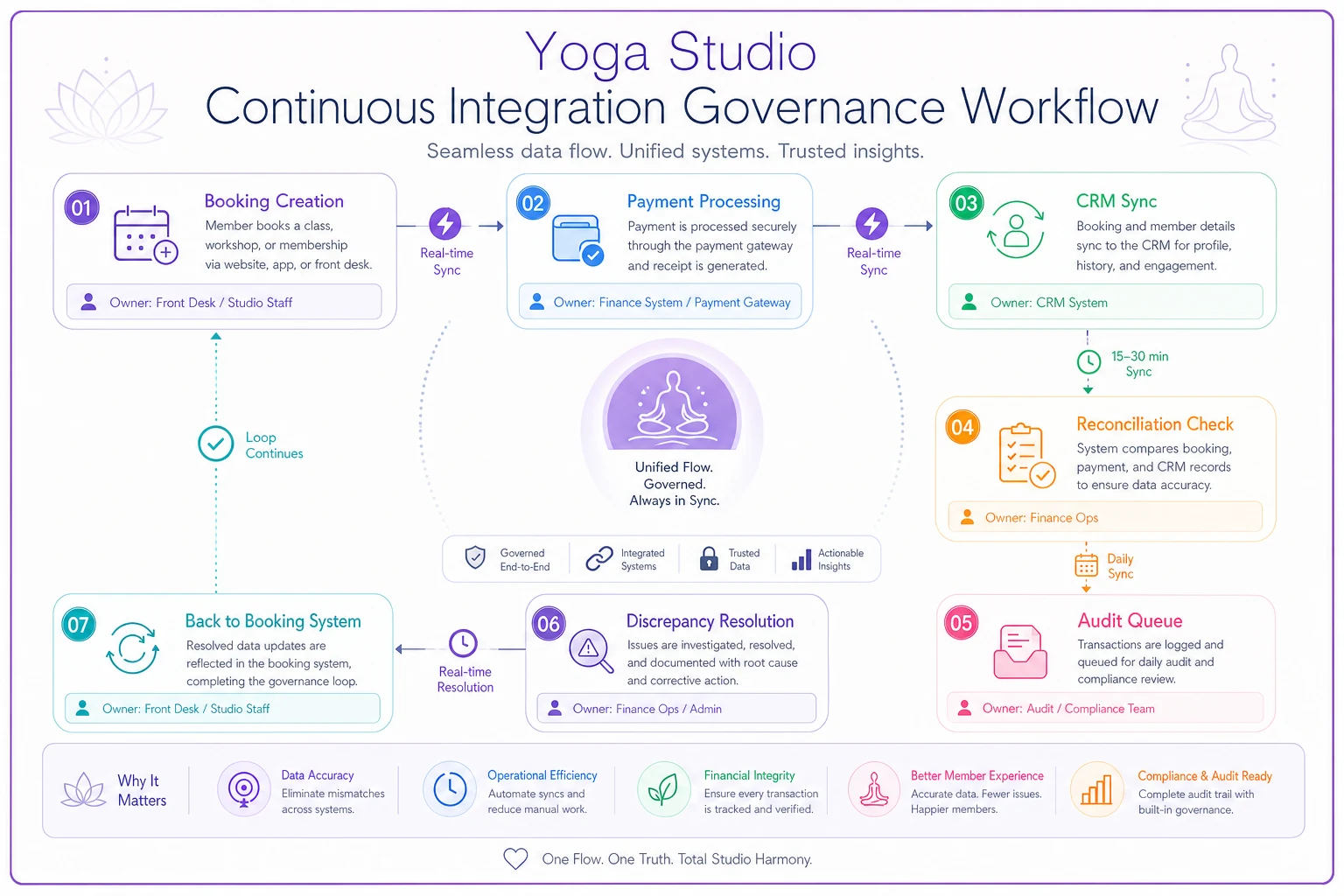
The loop only works when each handoff point has a defined owner and a documented rule. Without that, you're just hoping the systems sort it out themselves — and they won't.
Building your integration governance framework
The studios that handle this well long-term all share one thing: they treat integrations as operational infrastructure, not technical features. Your governance framework needs five components:
Data ownership matrix: Who owns customer data? Who owns payment data? Who owns scheduling data? Not which system — which human role in your organization.
Change control process: When you update a membership type, add a new class category, or change pricing, how does that propagate? What's the testing process? Who signs off?
Monitoring dashboard: Building on your existing studio operations dashboard, add integration health metrics — sync success rate, data discrepancy counts, average sync latency.
Incident response plan: When integration fails during peak booking time, who gets called? What's the communication plan to staff and students? What manual processes kick in?
Documentation standards: Every custom field mapping, every sync rule, every API configuration needs to be documented. When your tech-savvy manager leaves, their knowledge shouldn't walk out with them.
Most of these aren't technical problems — they're organizational decisions. The documentation and ownership matrix alone will prevent a significant portion of the recurring issues studios deal with.
The proactive maintenance schedule that prevents most issues
Monday morning: Review weekend sync logs. Check for any failed syncs from high-volume Saturday/Sunday. Clear the retry queue.
Wednesday afternoon: Spot-check upcoming weekend bookings. Verify payment status for all Saturday morning classes.
Friday evening: Ensure all instructor schedules for next week have synced. Confirm membership renewals processing for month-end have completed.
First of month: Deep reconciliation of previous month. Update data mapping for any new fields or features. Test disaster recovery processes.
Quarterly: Full audit as described above. Update integration documentation. Review and optimize sync schedules based on actual usage patterns.
In practice this runs under 4 hours weekly and prevents those 12-hour emergency fixes when everything breaks at once.
When good enough beats perfect
Most tech vendors won't tell you this: perfect integration is usually overkill for yoga studios. You're not running a stock exchange. A few seconds of sync delay won't destroy your business.
What matters is consistency and predictability. One studio runs all their integrations on 30-minute batch schedules except for payments. It's not real-time, but it's completely reliable. They haven't had a major sync failure in over a year and a half.
The trap many studios fall into is chasing increasingly complex integration scenarios instead of nailing the basics. They'll spend weeks trying to sync custom fields for marketing campaigns while their core booking-to-payment sync fails silently every few days.
-
Booking creation to payment processing
-
Payment success/failure to booking status
-
Membership changes to booking permissions
-
Cancellations across all systems
-
Basic customer info synchronization
Everything else — attendance tracking, marketing preferences, detailed analytics — can come later. Seriously, don't touch any of that until these five are boring and reliable.
Scaling your integration governance
When you're small, one person can handle all integration monitoring. Studios with multiple locations or complex class schedules need something more distributed.
Local validators: Each location has someone who spot-checks their own classes daily. They don't fix integration issues, but they flag discrepancies.
Central coordinator: One person owns overall integration health. They investigate issues, coordinate fixes, and run the weekly reconciliation.
Technical escalation: Whether internal or external, you need someone who can actually fix API issues, update field mappings, and modify sync rules.
At 4+ locations or 50+ weekly classes, you probably need actual governance meetings — weekly 15-minute standups where you review integration metrics, discuss upcoming changes, and assign investigation tasks.
The hidden cost of bad integration
Poor yoga studio tech integration doesn't just waste time — it erodes trust. When students can't rely on their bookings being honored, when instructors don't trust the attendance counts, when you can't confidently report revenue, the entire operation starts to feel shaky.
One studio owner lost three instructors in six months, partly because payment calculations were constantly wrong due to sync issues. The instructors didn't trust they were being paid correctly, even when they were.
Another studio had members posting negative reviews because they kept getting charged after cancelling. The cancellation processed in the booking system but didn't sync to payments. By the time the issue was fixed, they'd lost around 30 members and their reputation took months to recover.
These aren't technical problems. They're business problems caused by technical failures.
Making integration governance sustainable
The biggest challenge isn't setting it up — it's maintaining it over time. Initial enthusiasm fades, other priorities emerge, and suddenly you're back to reactive firefighting.
Automate the boring parts: Use monitoring tools that alert you to problems. Set up automated reconciliation reports. Let technology handle the repetitive checks so humans can focus on investigation and resolution.
Rotate responsibilities: Don't let one person become the integration expert. Rotate weekly reconciliation duties. Have different people run quarterly audits. This spreads knowledge and prevents single points of failure.
Connect it to revenue: Track how much time and money bad integrations actually cost. When you can show that 2 hours of weekly governance prevents several thousand dollars in monthly revenue leakage from booking errors, it's a lot easier to maintain commitment.
Your 30-day integration improvement plan
Stop reading about integration and start fixing yours. Here's exactly what to do over the next 30 days:
Week 1: Document current state. List all your systems. Map how data flows between them. Note every manual reconciliation you're doing.
Week 2: Define your source of truth for each data type. Create your sync schedule. Document your failure handling rules.
Week 3: Implement daily reconciliation checks. Start with booking vs payment for next-day classes. Add more checks as you get comfortable.
Week 4: Run your first full audit. Use the framework above. Document everything you find. Create your go-forward governance schedule.
The studios that nail yoga studio tech integration aren't necessarily more technical. They just treat integration as part of operations rather than a technical afterthought. Clear rules, regular checks, and defined processes for when things go wrong.
AI-powered operational software can automate a good chunk of this governance — automatically detecting discrepancies, managing reconciliation workflows, flagging potential failures before they blow up. But even with automation, you still need the underlying governance framework. The software makes it easier to execute consistently; it doesn't replace the thinking.
The path forward
Your booking system, payment processor, and CRM will never perfectly sync on their own. They're built by different companies with different priorities and different data models. But with proper governance, you can keep them close enough to run your studio efficiently.
Start with the basics. Get your daily reconciliation running. Document your sync rules. Build your audit workflow. Once these foundations are solid, you can add sophistication.
The difference between studios that scale successfully and those that hit operational walls usually isn't the quality of their classes or instructors. It's the boring operational infrastructure — like integration governance — that keeps everything running as complexity grows.
Your students don't care about your integration architecture. But they definitely care when their booking disappears, their payment fails incorrectly, or their membership doesn't work. Getting yoga studio tech integration right isn't glamorous work, but it's the foundation that lets everything else function properly.
Stop treating integration as a technical problem and start treating it as an operational discipline. Your future self will thank you for it.
Stop treating integration as a technical problem and start treating it as an operational discipline. Your future self will thank you for it.
Ready to elevate your studio operations?
Join 1,500+ yoga studios using Yoglyly to save time, reduce scheduling conflicts, and enhance member experiences.