

Peak windows for yoga studios aren't the long holiday stretch most people assume. They're tight — sometimes just 9 to 14 days. The week between Christmas and New Year's. The three days before a New Year intention workshop. The post-Thanksgiving "I overate, fix me" surge. These windows don't behave like your normal January-resolution ramp, and that's exactly why studios keep getting caught off guard.
The mistake isn't failing to plan. Most owners plan something. The mistake is planning for the wrong shape of demand. A normal month is a gentle wave. A peak window is a spike that arrives, overwhelms two or three class times, and then vanishes before you've finished adjusting. By the time you've added classes, the window has closed and you're staring at a half-empty 6am slot you created in a panic.
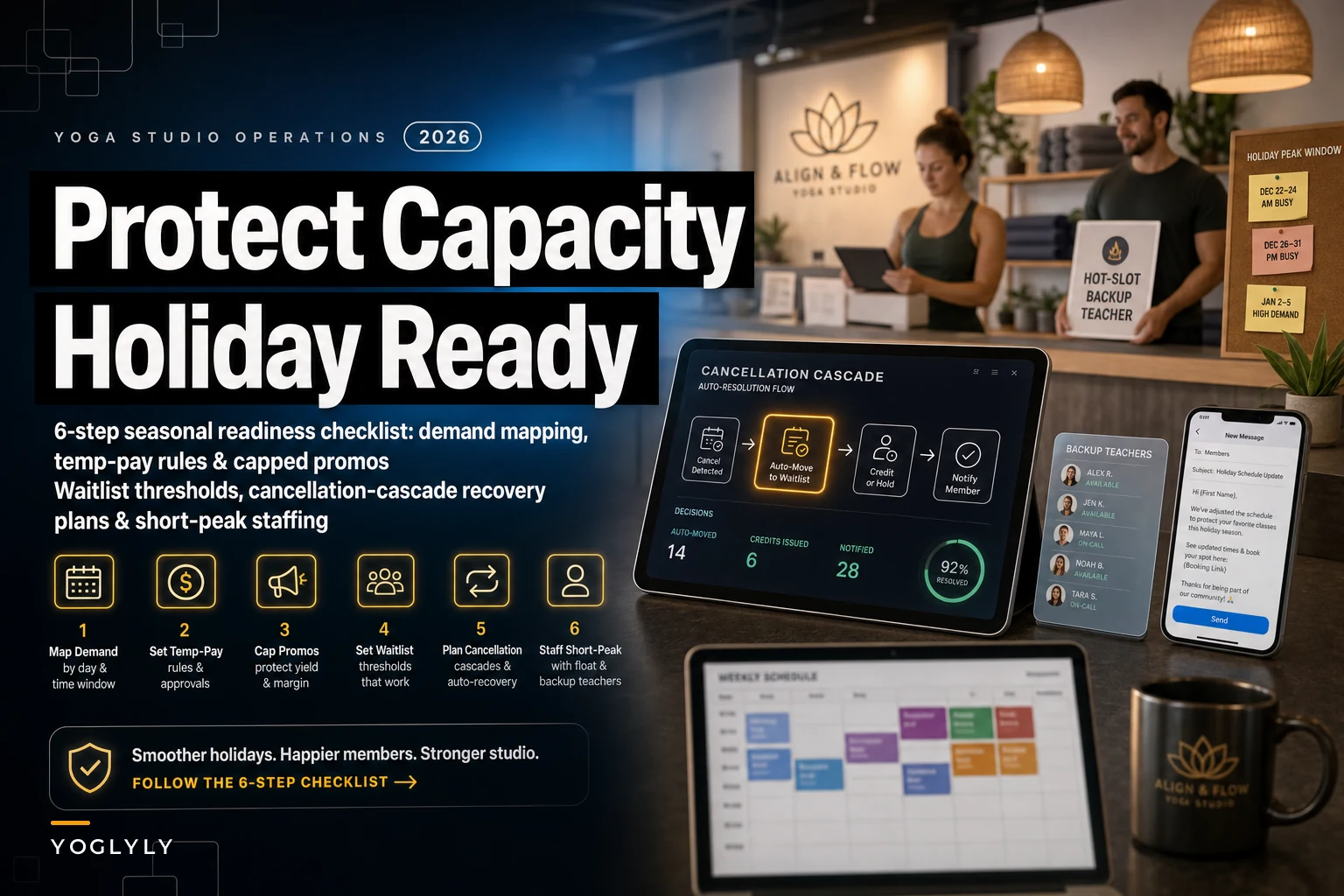
So this is a tight, 6-step checklist built specifically for short peak windows. Not for seasonality in general, not for your yearly calendar. Just the 10-ish days where holiday scheduling either works smoothly or falls apart in front of your most engaged students.
Step 1: Map demand by *slot*, not by day
The first thing that goes wrong is averaging. Owners look at "holiday week was busy" and add capacity across the board. But peak demand almost never spreads evenly — it clumps into a few specific class times.
What turns up consistently across studios is that holiday spikes concentrate into late-morning and early-evening slots, while early-morning attendance actually drops during the holidays because people are traveling or sleeping in. If you add a 6:15am class to handle "the rush," you've added capacity exactly where demand fell off a cliff.
Before anything else, pull the last two years of attendance for the specific window and break it down slot by slot. You're looking for the two or three class times that historically run hot.
A typical breakdown for a studio with around 24 mats looks something like this:
| Slot | Normal week avg | Last holiday window avg | Fill rate | Action |
|---|---|---|---|---|
| 6:15am | 14 | 8 | 33% | Leave alone / consider cutting |
| 9:30am | 18 | 23 | 96% | Add overflow capacity |
| 12:00pm | 11 | 21 | 88% | Watch waitlist closely |
| 5:30pm | 20 | 24 (capped) | 100% | Add a parallel class |
| 7:00pm | 16 | 19 | 79% | Hold steady |
The pattern jumps out immediately. You don't have a studio-wide capacity problem. You have a 9:30am and 5:30pm problem. That's a completely different — and cheaper — thing to solve.
If you don't have clean two-year data, a few simpler forecasting approaches can get you close enough. Even eyeballing last year's sign-in sheets for just the hot slots beats spreading capacity blindly.
Step 2: Write your temp-pay rules *before* you need a teacher at 9pm
This is where holiday scheduling quietly eats margin. You identify a hot slot, you need coverage, and you're texting teachers two days out offering whatever it takes to get someone in. That "whatever it takes" is how a $45 class turns into a $90 holiday-premium class with no real plan behind it.
Eliminate class scheduling chaos.
Yoglyly helps you book, confirm & manage every class seamlessly.
- Centralized class scheduling
- Member notifications
- Instructor and resource management
No credit card required
Peak windows create urgency, and urgency kills pay discipline. The fix is boring but it works: decide your holiday pay rules in November, write them down, and apply them to everyone the same way.
-
Standard holiday rate — your normal per-class rate, nothing extra, for teachers already on the schedule.
-
Short-notice premium — a fixed bump (say $15–25 flat, not a percentage) for classes picked up with under 72 hours notice.
-
Blackout-day rate — a separate, higher flat rate for the genuinely hard dates (Dec 24, 25, 31, Jan 1) where you know nobody wants to teach.
The reason flat dollar amounts beat percentages: percentages reward your highest-paid teachers for the same coverage and make your cost unpredictable. A flat short-notice premium is easy to communicate and easy to forecast. If you add six premium classes across the window, that's a known number — roughly $90–150 in extra pay, not a mystery.
Studios that don't pre-set blackout rates almost always overpay on the easy days and underpay on the hard ones, because they're negotiating each slot in isolation. Setting it once removes the negotiation entirely.
Step 3: Cap your promos *to capacity*, not to a date
This is the one that bites studios the hardest. A holiday promo runs — "Bring a friend free" or a discounted New Year pack — and it works too well on exactly the slots that were already full. Now your best students are on a waitlist behind a crowd of one-time promo guests who may never come back.
The problem is promos usually have a time cap ("valid through Jan 5") but no capacity cap. Time caps control how long the offer runs. They do nothing to control where the demand lands.
What actually protects your peak window:
-
Restrict promo redemptions to non-peak slots. Your "bring a friend" offer is valid any class except the two hot ones. This funnels new traffic into your 6:15am and 7:00pm classes that have room — which is better for the guest experience anyway. They're not jammed into a packed 24-mat room.
-
Cap total redemptions per slot. Allow, say, 4 promo spots per class. Once those fill, the rest of the mats stay open for paying regulars.
-
Cap the promo total for the window. Decide the offer dies at 60 redemptions regardless of the calendar date. If it hits that on day four, it's done. It did its job.
A studio running an uncapped friend promo once filled their 5:30pm to 100% guests on day two, bumped 9 regulars to the waitlist, and got three annoyed emails from exactly the members they most wanted to keep. The promo "worked" on paper and cost them goodwill with their base. Capping by capacity would have prevented all of it.
If you're building a real promo calendar rather than reacting window by window, it's worth tying these caps into your broader 12-month marketing calendar so holiday offers reinforce capacity instead of fighting it.
Step 4: Set waitlist thresholds that actually *trigger* a decision
Most studios treat the waitlist as a passive list. Someone drops, someone gets pulled in. During a normal month that's fine. During a peak window, the waitlist is your single best real-time demand signal — and almost nobody uses it that way.
Pick a waitlist number that, once crossed, forces an action. Not a vague "keep an eye on it." An actual trigger.
-
Waitlist hits 5 flag the slot. No action yet, just watch.
-
Waitlist hits 8 two sessions in a row open a parallel class or a second room if you have one.
-
Waitlist hits 12 you under-forecasted. Add a recurring class at that time for the rest of the window and notify the waitlist directly.
The number isn't magic — set it relative to your room size. The discipline is what matters. Without a trigger, owners sit on a growing waitlist telling themselves "it'll clear," and it doesn't, and your most loyal people spend the holidays getting bumped.
One thing worth noting: the waitlist depth tells you more than the fill rate. A class at 100% with zero waitlist is fine. A class at 100% with 11 people waiting means you're leaving revenue and goodwill on the floor. Watch the depth.
Step 5: Build the recovery plan before the window, not after
Peak windows break things. A teacher gets sick on Dec 23. A snowstorm kills your morning classes. Your booking system hiccups on New Year's Day when everyone's trying to redeem their new pack. The studios that handle this well aren't lucky — they decided the fallback in advance.
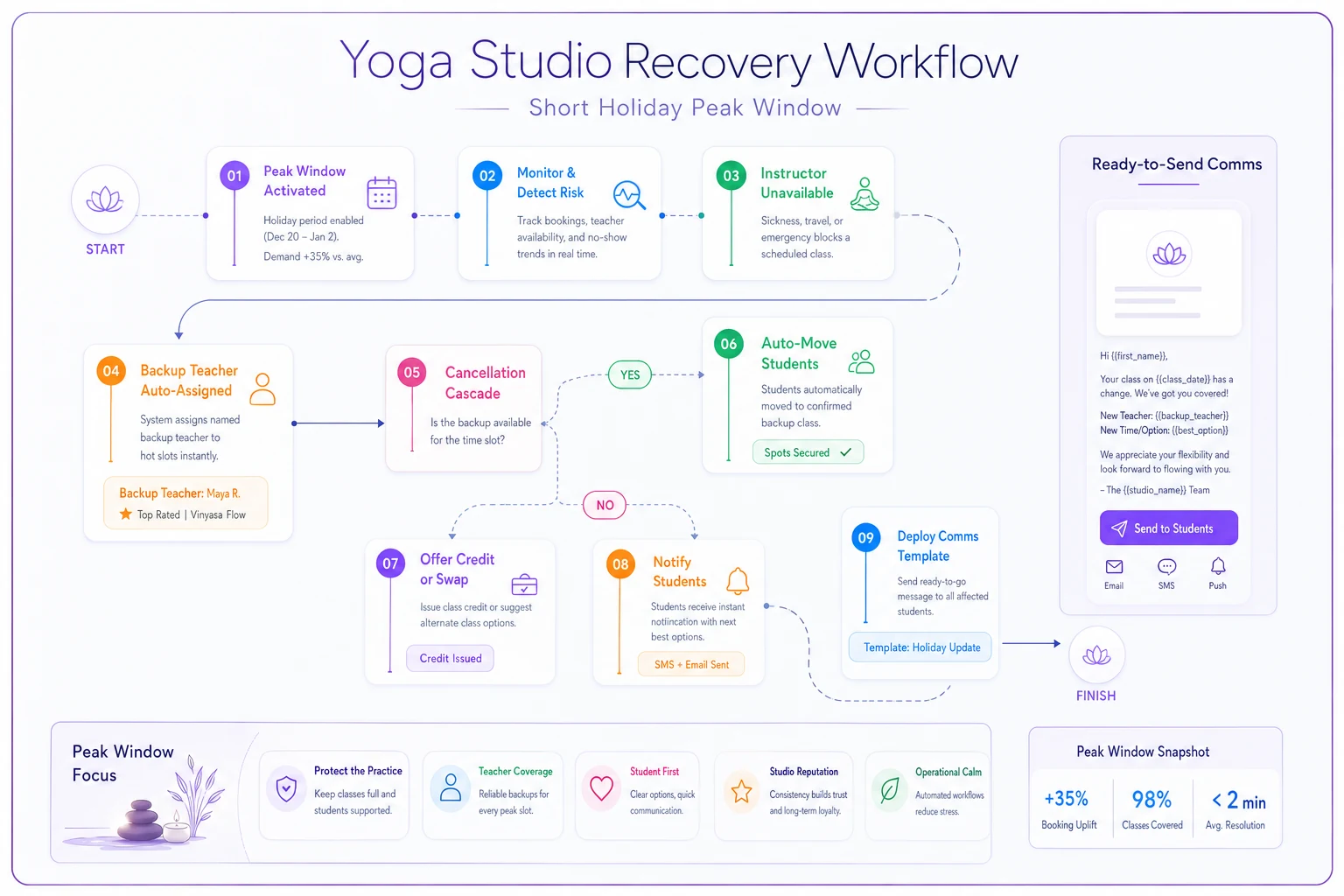
A recovery plan for a short window doesn't need to be elaborate. Three things decided ahead of time is enough:
-
A named backup teacher per hot slot. Not "someone will cover." A specific person who's already agreed, already paid under your blackout rate, already knows they might get the call.
-
A cancellation-cascade rule. If you cancel a class, what happens to those bookings? Auto-move to the next available slot? Credit back? Decide it once so staff aren't improvising at 7am.
-
A comms template ready to send. A pre-written text or email for "class cancelled, here's your options." Writing this calmly in November beats writing it panicked during a storm.
A simple recovery workflow looks like this.
Recovery always costs more when it's improvised. A last-minute sub found at midnight costs more than a pre-arranged backup. A confused cancellation handled by three staff members in a group chat costs more in time and errors than one rule everyone already knows. The plan isn't about preventing chaos — it's about pre-pricing it so a bad day doesn't turn into a bad window.
This ties directly into cash flow too. Holiday windows swing your revenue hard in both directions, and if you want these spikes and dips to stop surprising you, mapping them into a monthly financial calendar makes the recovery costs something you've already budgeted for.
Step 6: Run a 30-minute post-window debrief
The window closes, everyone's exhausted, and the data that would make next year easy gets lost. This is the most-skipped step and the one with the highest return, because it costs nothing.
Within a week of the window closing, write down:
-
Which slots actually ran hot vs. what you predicted in Step 1
-
How many promo redemptions landed, and where
-
What your waitlist thresholds triggered, and whether the triggers were right
-
What broke, and what the recovery plan handled vs. missed
-
Total premium pay spent vs. planned
This becomes next year's Step 1. Studios that debrief every window get noticeably better at forecasting within two or three cycles — the hot slots become predictable, the pay budget gets tighter, and the panic texts stop. It's a small habit with compounding returns.
A real scenario
A single-location studio, around 24 mats, roughly 330 regular monthly bookings, kept losing money on holiday weeks despite being "busy." Every year they'd add three or four extra classes across the window and most ran half-empty, while two slots stayed jammed with a growing waitlist.
The fix wasn't more classes. They mapped the window slot by slot, found their spike lived almost entirely in two class times, cut the panic-added early-morning class, and added a single parallel class at 5:30pm covered by a pre-arranged backup teacher on a flat blackout rate. They capped their friend promo at 4 spots per class and steered new traffic toward the quiet slots.
That window: premium pay dropped by roughly a third versus the year before, the two hot slots stopped bumping regulars, and the quieter slots actually filled because the promo traffic had somewhere to land. Nothing dramatic in the revenue number — maybe a few hundred dollars better — but the margin and the member experience both improved, and the owner stopped dreading the last two weeks of December.
When this is worth it (and when it isn't)
This level of micro-scheduling makes sense if your peak windows genuinely spike — if you can point to specific class times that overflow while others sit empty. If your holiday demand is flat or just a mild lift across the board, you're over-engineering. Keep your normal grid and skip most of this.
It's also a bad idea to build all six steps the first year if you have no historical data. Start with Steps 2, 3, and 5 — the pay rules, the promo caps, and the recovery plan — because those protect you regardless of forecasting accuracy. Add the demand mapping and thresholds once you've got a window or two of real data to work from.
The whole point of holiday scheduling isn't to squeeze every dollar out of a two-week spike. It's to stop the predictable stuff — overpaying for coverage, filling your hottest class with promo guests, bumping your most loyal members — from quietly happening every single year. Decide the rules while it's calm, and the window mostly runs itself.
Ready to elevate your studio operations?
Join 1,500+ yoga studios using Yoglyly to save time, reduce scheduling conflicts, and enhance member experiences.