

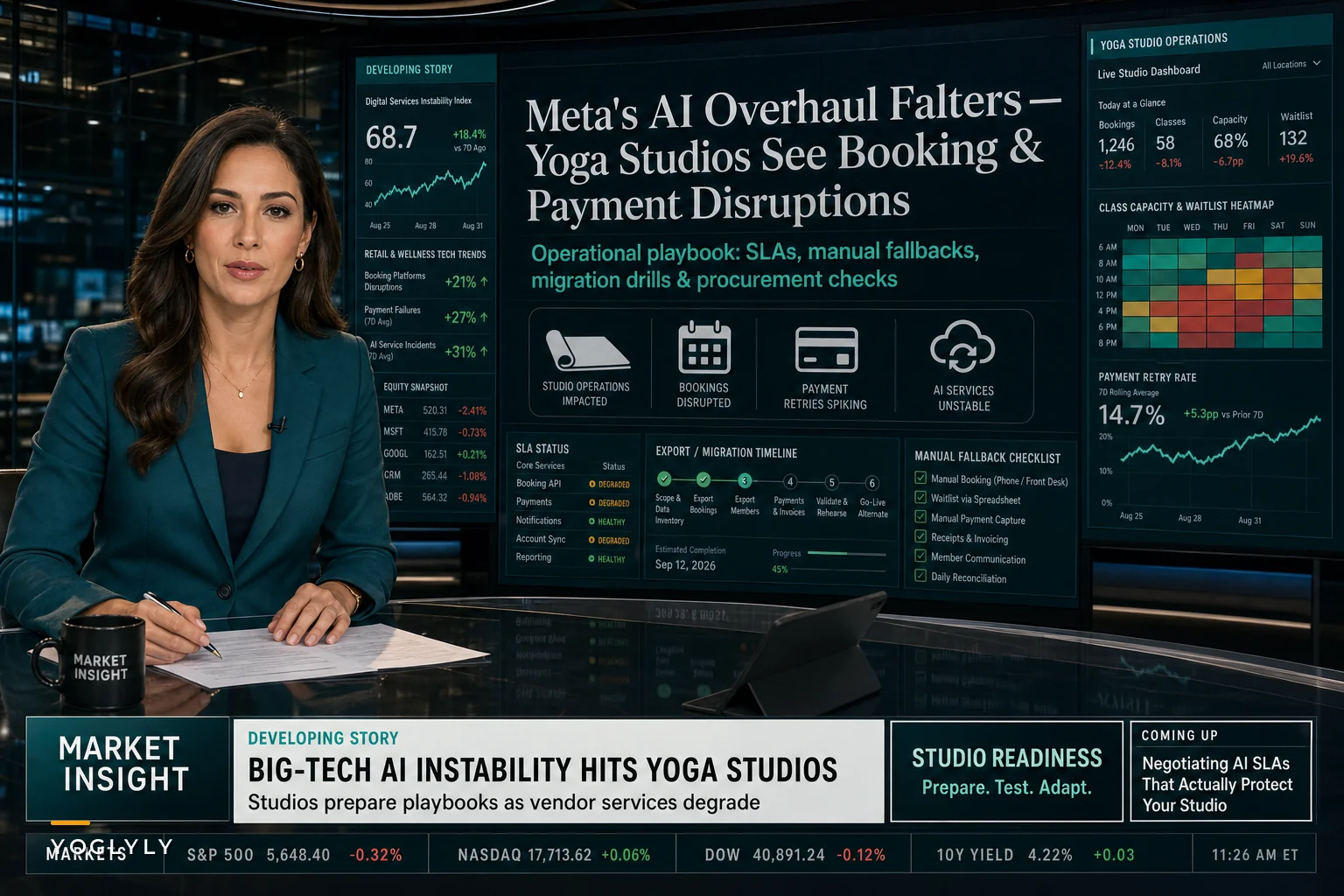

The recent Reuters investigation into Meta's failed attempt to reorganize huge chunks of its workforce around AI is worth paying attention to — not because your studio is anything like Meta, but because it shows how fast a company's AI plans can fall apart. According to Reuters' reporting on how the transformation went sideways, what looked like a confident, aggressive roadmap ran into technical limits, operational messiness, and internal pushback, forcing a walk-back.
That's a company with effectively unlimited engineering talent and cash. If their AI roadmap can stall, the smaller vendor powering your class scheduling or automated member texts can absolutely change direction too — usually with far less warning and far worse communication.
For a studio, that's not some abstract tech story. It's the day your automated waitlist promotions stop firing, or a "temporary" pricing change adds $40 a month, or the integration between bookings and payments silently breaks and nobody finds out until three members complain about double charges. This piece is about building an AI vendor contingency plan before any of that happens — so a vendor's bad quarter doesn't become your bad month.
The real risk isn't the AI failing. It's the vendor changing.
Most studio owners think about AI risk as "what if the model gives a wrong answer." That's the wrong worry. In real operations, the damage almost never comes from a bad prediction. It comes from a business decision on the vendor's side:
-
A feature you built a workflow around gets deprecated
-
Support response times slip from hours to days
-
Pricing shifts from flat to usage-based, and suddenly your automated reminders cost more per send
-
An integration partner gets dropped, so your CRM stops talking to your booking tool
-
The AI feature that was "included" moves to a higher-priced tier
The Meta story is a clean example of the underlying pattern: leadership commits publicly to an AI-heavy direction, reality doesn't cooperate, and priorities quietly get reshuffled. When that happens at a vendor you depend on, the roadmap items you were promised get pushed, and the humans who used to fix your tickets get reassigned.
What we've seen across a lot of small operations is that the studios who get hurt aren't the ones using AI features. They're the ones who let those features become load-bearing without knowing it. Nobody wrote down what would break if the tool vanished on a Tuesday.
A quick way to see how exposed you actually are
Before you can build any kind of fallback, you need to know which parts of your operation would actually stop working if an AI-enabled feature degraded. Most owners underestimate this because the automation is invisible when it's working.
Eliminate class scheduling chaos.
Yoglyly helps you book, confirm & manage every class seamlessly.
- Centralized class scheduling
- Member notifications
- Instructor and resource management
No credit card required
Here's a rough exposure map worth filling in for your own studio:
| Workflow | AI-enabled? | What breaks if it fails | Manual fallback exists? | Recovery time |
|---|---|---|---|---|
| Class booking + waitlist | Often (smart waitlist, overbooking logic) | Members can't self-book, no auto-promotion | Usually partial | Hours |
| Payments + billing | Sometimes (fraud checks, retries on failed cards) | Failed charges, missed dunning | Rarely documented | Days |
| Member messaging (email/SMS) | Frequently (send-time, segmentation) | Reminders stop, no-shows spike | Sometimes | Hours to days |
| Instructor scheduling | Increasingly | Coverage gaps, double-booked rooms | Depends on studio | Same day |
| Reporting / attendance forecasting | Often | Flying blind on staffing decisions | Yes (manual) | Low urgency |
The column that matters most is the fourth one. If "manual fallback exists" is a guess rather than a documented process, that row is a real risk. The forecasting row can fail for a week and you'll survive. The payments row failing for a week is a genuine crisis.
The three failure modes you actually have to plan for
Slow degradation. The tool still works, but worse. Support gets slower, a feature gets flakier, response times drift. This is the most common and the easiest to ignore because there's no single alarm moment. You just wake up one month and realize your no-show rate crept from around 8% to 13% because reminder timing quietly got worse.
Sudden feature loss. A capability disappears or moves behind a paywall. One week your automated review requests fire after attendance; the next week that's a "premium" add-on. Annoying, but usually survivable if you catch it fast.
Hard failure or vendor exit. The company gets acquired, sunsets a product, or pivots away from your use case entirely. This is rare but existential, and it's the reason data export and migration planning matter more than any single feature.
The mistake owners make is preparing only for the third one — the dramatic shutdown — while slow degradation is what actually erodes revenue month after month without anyone noticing.
Build the contingency plan around workflows, not vendors
The instinct is to make a plan per vendor. That's backwards. Vendors get bought and renamed. Your workflows stay the same. Build the plan around the operational outcomes you can't lose.
A practical sequence to work through:
-
List your non-negotiable workflows. Bookings, payments, and member communication are almost always on this list. Reporting usually isn't. Be honest about which is which.
-
Tag each workflow with its AI dependency. Note specifically what the AI does — is it optimizing something, or is it required for the thing to function at all? "Smart send times" is optimization. "Automatic card retry on decline" might be load-bearing.
-
Write the manual version of each critical workflow. If your smart waitlist died tomorrow, what's the human process? Who watches the list? How do they promote people? This should be a one-page doc a new front-desk hire could follow.
-
Define your trigger thresholds. Decide in advance what level of degradation makes you act. Something like: "If support hasn't responded in 48 hours twice in one month, we start evaluating alternatives." Deciding this before you're stressed keeps you from either overreacting or freezing.
-
Schedule a quarterly export. Pull your member list, transaction history, and class schedules into a format you own. Not a screenshot — an actual CSV you could hand to a new provider.
-
Keep one alternative warm. You don't need to run two systems. You need to know which one you'd move to and roughly how the migration would go, so you're not researching from scratch under pressure.
A visual flow can help keep the sequence clear when you're assigning tasks and timelines.
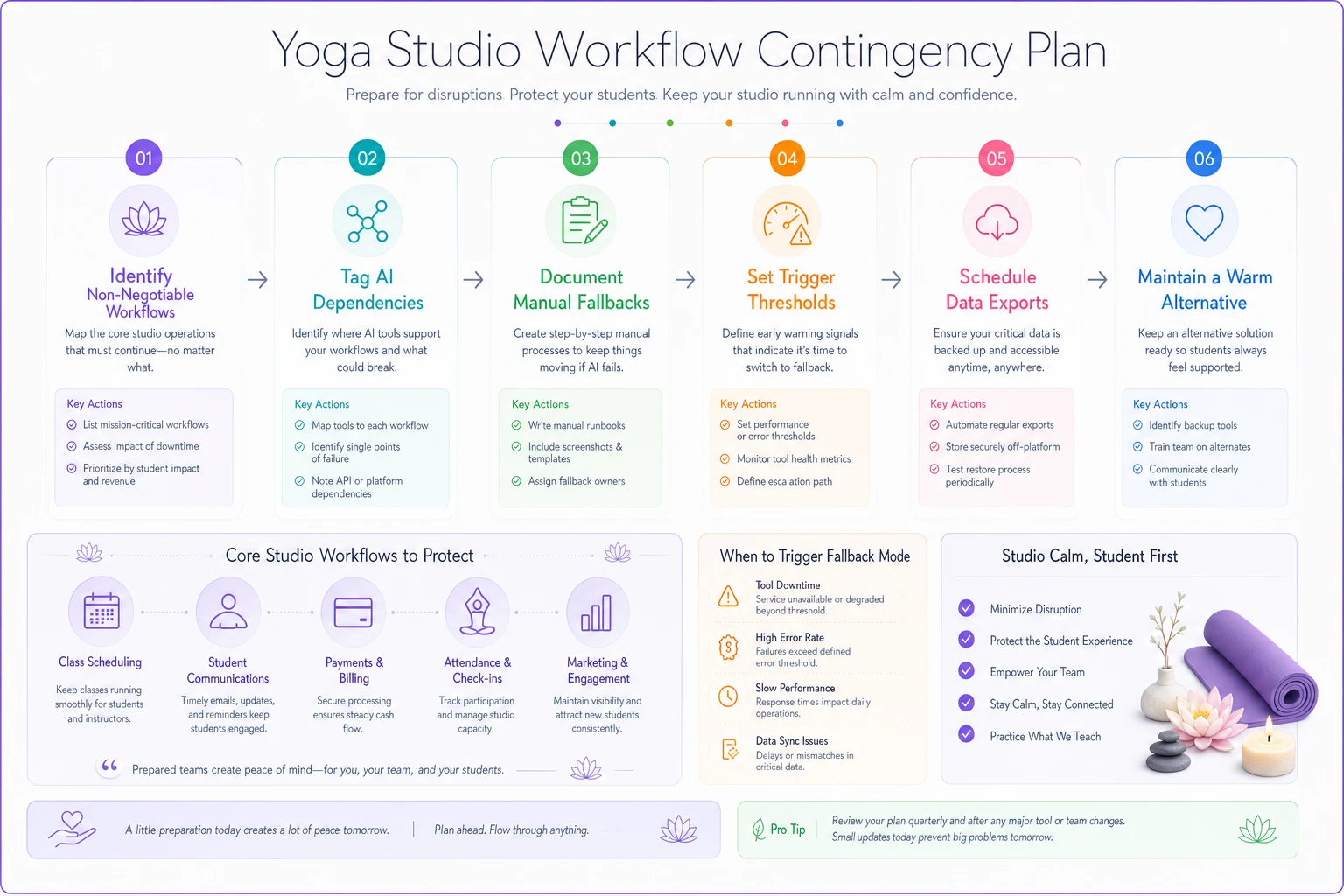
Automate the quarterly export so it runs without relying on memory.
You don't need a complex plan — you need the right checklist and a regular habit of exercising it.
The contract clauses studios almost never ask for
Most studio-vendor relationships run on a click-through terms page nobody read. For anything running your core operations, that's not enough. You don't need a lawyer on retainer, but you do need to push on a few specific things before signing or renewing.
-
Data export rights. Explicit language that you can export your full member, booking, and payment data in a standard format, at any time, at no extra charge.
-
Notice period for feature or pricing changes. Even 30–60 days of warning turns a crisis into an inconvenience.
-
Support response SLAs in writing. "Best effort" means nothing. Ask for defined response windows on billing and booking issues specifically.
-
Continuity on acquisition. A clause that your terms and pricing survive if the vendor is acquired, at least through your current term.
-
Downgrade path. If an AI feature moves to a higher tier, what happens to the workflow you built on it?
If a vendor won't put any of this in writing, that's useful information. It tells you how they'll treat you when their roadmap shifts. Treating procurement as risk management rather than feature shopping is worth building into how you buy any tool — and it pairs directly with keeping a disciplined tech procurement checklist so you don't accumulate vendor debt in the first place.
A real scenario: when the reminders quietly broke
A mid-sized studio running roughly 330–360 bookings a week leaned heavily on automated SMS reminders tied to their booking platform's AI send-time feature. It worked well for about a year. No-shows sat around 7–9%.
Then the vendor reworked their messaging engine. Nobody announced it clearly — there was a line in a changelog. Send times got worse, some reminders went out at odd hours, and a chunk of members stopped getting the second reminder entirely. Within about six weeks, no-shows drifted up toward 14%. At their class economics, that gap worked out to somewhere in the range of $1,800–$2,600 a month in lost or unrecovered spots, plus instructors teaching thinner rooms.
The frustrating part wasn't the outage. It was that it took six weeks to even notice, because nobody had a threshold they were watching. Once they set a simple rule — "if no-show rate crosses 11% for two straight weeks, investigate the reminder pipeline first" — they caught the next hiccup in days, not months. They also wrote a bare-bones manual fallback: front desk sends a batch reminder text the evening before for the next day's fullest classes. Not elegant, but it capped the downside.
That's the whole point of a contingency plan. It doesn't prevent the vendor from stumbling. It just shortens the time between "something's off" and "we're handling it."
When leaning hard on AI features actually makes sense
None of this is an argument against using AI-enabled tools. The automation is genuinely useful and, for most studios, worth it. The question is how much you let it become invisible infrastructure.
It makes sense to lean in when: the feature saves real staff hours, you've documented a manual fallback, and losing it for a few days would be annoying rather than catastrophic. Send-time optimization, attendance forecasting, review-request timing — these are good places to use AI aggressively because the downside of failure is low.
Be more cautious when: the AI feature sits directly in your money path or your legally-sensitive path. Payment retries, billing logic, anything touching refunds or member data. Use it, but keep the manual process fresh and know exactly how to run without it.
Slow down when: a single vendor is quietly becoming your bookings, payments, messaging, and CRM all at once. Consolidation is convenient right up until that one vendor changes course, and then every workflow you have is exposed to the same single decision.
The deeper lesson from Meta's stumble
The Reuters investigation into how the plan to replace staff with AI imploded isn't really a story about AI being bad. It's a story about how confidently a roadmap can be announced and how quietly it can be walked back. The gap between the promise and the delivery is where operational risk lives.
For a studio, the takeaway is pretty unglamorous. Use the AI features — they're genuinely good. But treat every AI-enabled workflow as something that could change on you, because the people building it are making bets under pressure just like Meta was, and their bets don't have to work out for yours to suffer.
The studios that stay steady through vendor turbulence aren't the ones avoiding AI or the ones adopting it fastest. They're the ones who know exactly what would break, have written down how to run without it, and decided ahead of time what would make them walk away. That's not paranoia. That's just running an operation you actually control.
The studios that stay steady through vendor turbulence aren't the ones avoiding AI or the ones adopting it fastest. They're the ones who know exactly what would break, have written down how to run without it, and decided ahead of time what would make them walk away. That's not paranoia. That's just running an operation you actually control.
Ready to elevate your studio operations?
Join 1,500+ yoga studios using Yoglyly to save time, reduce scheduling conflicts, and enhance member experiences.